ChemPal Documentation - v1.7.0
Open source project aimed at helping amateur chemistry hobbyists find the best deals on chemical reagents. There are plenty of similar services out there for businesses, universities and research institutions, but none are available for individuals and hobbyists. ChemPal only searches suppliers that sell to individuals and ship to residences.
Demo
Features
- Search up to 26 different suppliers from a single interface
- Search using the reagent names, chemical formulas, CAS numbers or SMILES.
- Search using AST (Abstract Syntax Tree). Examples:
(sodium OR potassium) AND (carbonate OR hydroxide)
"sodium borohydride" AND NOT (triacitoxyborohydride) - Advanced cache management allowing for faster query times
- Constrain searches to suppliers that ship to your country
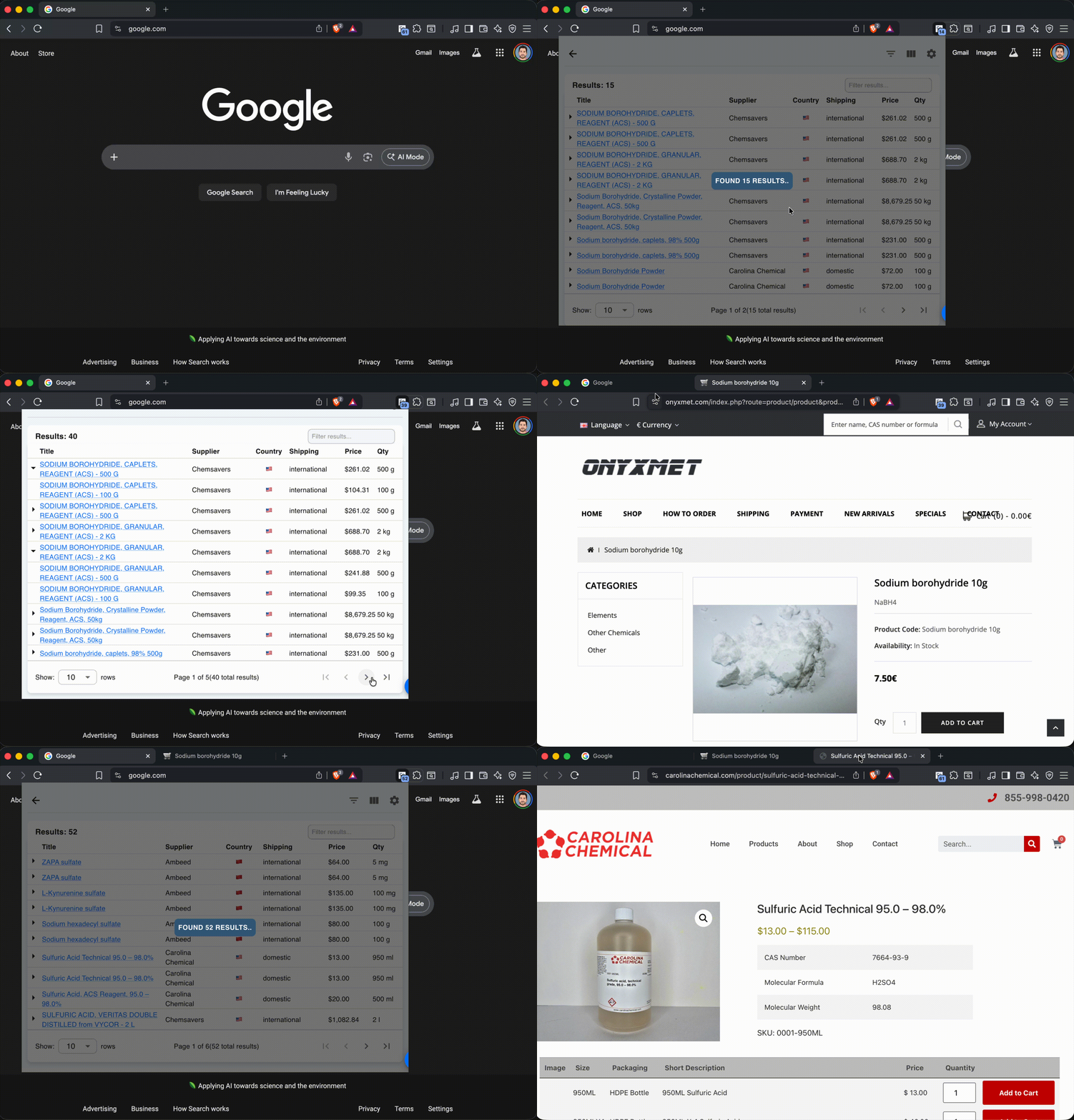
- Compare prices across suppliers in one sortable, filterable table (prices converted to USD so different currencies line up)
- Quantities normalized to a common unit, so you can compare price-per-amount fairly no matter how each supplier lists it
- Auto-detected chemical details: CAS, formula, molecular weight, purity/grade, and concentration
- One-click links to SDS, TDS, and COA documents when a supplier provides them
- Works on both Chrome and Firefox, with light and dark themes
- Viewable from popup or in separate browser tab
- Price tracking on all products and variants
- No account creation required to use extension
- No data collection by the developer — see the Privacy Policy for exactly what stays local on your device and what is sent to the suppliers you search
Installation
Chrome Web Store (recommended for Chrome)
Install ChemPal directly from the Chrome Web Store and click Add to Chrome.
You can also install the latest release from the releases page. A Firefox Add-ons listing is on the way.
Chrome (from a release)
Download the chem-pal.crx asset, then go to your Chrome extensions, and click "Load Packed", then select the .crx file and import it.
Firefox
Download the chem-pal-firefox.zip asset, then open about:debugging#/runtime/this-firefox, click Load Temporary Add-on…, and select the downloaded zip (or its manifest.json).
Temporary add-ons are removed when Firefox restarts — re-load the zip to use
it again. A permanently installable signed .xpi (via addons.mozilla.org) is
not provided yet.
Node version
-
Make sure youre on node v22.15.0 and npm v10.9.2 or higher (use nvm if needed)
-
Windows NVM: Installer is here (i've never tried it)
-
OSX: Run
brew install nvm, then follow the steps about updating your~/.bash_profilethat it shows you in the output.
After nvm is installed, run:
nvm install --lts
nvm use --lts
node --version # Should output v22.15.0
Install pnpm (package manager)
npm install -g pnpm
Building the extension
For local development — loading as an unpacked extension:
git clone https://github.com/jhyland87/chem-pal.git
cd chem-pal
pnpm run setup
pnpm run build
Then import the build/ folder as an unpacked Chrome extension.
For Firefox, build the Firefox variant and load it as a temporary add-on:
pnpm run build:firefox
Then open about:debugging#/runtime/this-firefox → Load Temporary Add-on…
and select build-firefox/manifest.json.
pnpm run build produces a development build and includes the MSW
mock service worker plus source maps. Do not submit the output of
pnpm run build to the Chrome Web Store.
For a Chrome Web Store submission bundle, use:
pnpm run build:prod
This runs the production Vite build and packs the extension via
tools/pack-extension.js. The resulting artifact is the only build
intended for store submission.
Development
# Install dev dependencies
pnpm run setup
# Run unit tests
pnpm run test
# Run the build.
pnpm run build
Settings
- Documents
- src
- components
- SearchPanel
- index.ts
- AboutModal.tsx
- ColumnDrawerSection.tsx
- DrawerSearchPanel.tsx
- DrawerSystem.tsx
- ErrorBoundary.tsx
- ExportsPanel.tsx
- FavoritesPanel.tsx
- HelpTooltip.tsx
- HistoryPanel.tsx
- IconSpinner.tsx
- IconTextFader.tsx
- LoadingBackdrop.tsx
- MigrationPrompt.tsx
- OfflineOverlay.tsx
- PromptSnackbar.tsx
- ReportDialog.tsx
- ReviewPrompt.tsx
- SearchForm.tsx
- SearchPanelHome.tsx
- SettingsPanel.tsx
- SpeedDialMenu.tsx
- StatsPanel.tsx
- StatusBadges.tsx
- StatusBar.tsx
- SuppliersPanel.tsx
- TabHeader.tsx
- TabLink.tsx
- TabPanel.tsx
- ThemeProvider.tsx
- UpdatePrompt.tsx
- WhatsNewModal.tsx
- WhatsNewPrompt.tsx
- constants
- helpers
- advancedMode.ts
- analytics.ts
- backgroundFetch.ts
- bugReport.ts
- cas.ts
- collectionUtils.ts
- cookies.ts
- country.ts
- currency.ts
- dom.ts
- errorBuffer.ts
- exceptions.ts
- excludedProducts.ts
- exportResults.ts
- fetch.ts
- formulaPattern.ts
- history.ts
- i18n.ts
- price.ts
- priceHistory.ts
- product.ts
- productIdentity.ts
- productLabels.ts
- pubchem.ts
- PubChemProperties
- PubChemDescription
- getCidsByCas
- getCidByName
- getCidByFormula
- resolveIdentifierNames
- getCompoundProperties
- getSynonymsByCid
- getCompoundDescription
- pubchemCompoundUrl
- pubchemCasSearchUrl
- pubchemStructureImageUrl
- executeSDQSearch
- getCompoundNameFromAlias
- getRankedNamesByName
- isSimpleName
- suggestAlternativeSearch
- getPubchemIdFromDocument
- purchaseRestriction.ts
- quantity.ts
- request.ts
- requestCache.ts
- responseAggregate.ts
- schema-org.ts
- science.ts
- subscript
- subscriptToAscii
- superscript
- superscriptGlyph
- subscriptGlyph
- isMoleForm
- findFormulaInText
- findFormulaInHtml
- parsePurity
- findPurity
- buildGradeRegexes
- GRADE_REGEX
- LABELED_GRADE_REGEX
- GRADE_REGEX_SOURCE
- parseGrade
- purityGradeToPercentage
- ChemicalSpecs
- parseLocalizedNumber
- findMolarMass
- findMolarity
- parseChemicalSpecs
- formatFormula
- pickBroadestName
- sortablePurityGrade
- <internal>
- searchFilters.ts
- settingsMigration.ts
- smiles.ts
- sorting.ts
- supplierFilters.ts
- supplierStats.ts
- updates.ts
- utils.ts
- ucfirst
- md5sum
- objectToQueryString
- base64EncodeUtf8
- base36Timestamp
- generatePageSizes
- serialize
- deserialize
- sleep
- delayAction
- firstMap
- mapDefined
- decodeHTMLEntities
- htmlToAscii
- findPdfHref
- tryParseJson
- parseJsonFromDirtyString
- getUserLocation
- getUserLanguage
- getLanguageName
- stripHTML
- formatFromHtmlTurndown
- formatFromHtml
- formatTimestamp
- formatBytes
- toFiniteNumber
- getPath
- addActualValueToIssues
- preloadImages
- <internal>
- hooks
- hotkeys
- icons
- shared
- suppliers
- SupplierAladdinSci.ts
- SupplierAlboChemicals.ts
- SupplierAlchemieLabs.ts
- SupplierAllianceChemical.ts
- SupplierAmarisChemicalSolutions.ts
- SupplierAmbeed.ts
- SupplierAsesChem.ts
- SupplierBVV.ts
- SupplierBase.ts
- SupplierBaseAmazon.ts
- SupplierBaseMagento2.ts
- SupplierBaseMySimpleStore.ts
- SupplierBaseSearchanise.ts
- SupplierBaseShopify.ts
- SupplierBaseWix.ts
- SupplierBaseWoocommerce.ts
- SupplierBioFuranChem.ts
- SupplierCarolina.ts
- SupplierCarolinaChemical.ts
- SupplierChemsavers.ts
- SupplierConsolidatedChemical.ts
- SupplierDailyBioUSA.ts
- SupplierFactory.ts
- SupplierFtfScientific.ts
- SupplierGoldAndSilverTesting.ts
- SupplierHimedia.ts
- SupplierInnovatingScience.ts
- SupplierLabChem.ts
- SupplierLaballey.ts
- SupplierLaboratoriumDiscounter.ts
- SupplierLeroChem.ts
- SupplierLiMac.ts
- SupplierLibertySci.ts
- SupplierLoudwolf.ts
- SupplierMacklin.ts
- SupplierOnyxmet.ts
- SupplierOrbitNaturalProductDerivatives.ts
- SupplierS3Chemicals.ts
- SupplierScienceLab.ts
- SupplierSynthetika.ts
- SupplierTheLabStockroom.ts
- SupplierVWR.ts
- SupplierWarchem.ts
- index.ts
- SupplierAladdinSci
- SupplierAlboChemicals
- SupplierAlchemieLabs
- SupplierAllianceChemical
- SupplierAmarisChemicalSolutions
- SupplierAmbeed
- SupplierAsesChem
- SupplierBioFuranChem
- SupplierBVV
- SupplierCarolina
- SupplierCarolinaChemical
- SupplierChemsavers
- SupplierConsolidatedChemical
- SupplierDailyBioUSA
- SupplierFtfScientific
- SupplierGoldAndSilverTesting
- SupplierHimedia
- SupplierInnovatingScience
- SupplierLaballey
- SupplierLabChem
- SupplierLaboratoriumDiscounter
- SupplierLeroChem
- SupplierLibertySci
- SupplierLiMac
- SupplierLoudwolf
- SupplierMacklin
- SupplierOnyxmet
- SupplierOrbitNaturalProductDerivatives
- SupplierS3Chemicals
- SupplierScienceLab
- SupplierSynthetika
- SupplierTheLabStockroom
- SupplierVWR
- SupplierWarchem
- index.ts
- SupplierAladdinSci
- SupplierAlboChemicals
- SupplierAlchemieLabs
- SupplierAllianceChemical
- SupplierAmarisChemicalSolutions
- SupplierAmbeed
- SupplierAsesChem
- SupplierBioFuranChem
- SupplierBVV
- SupplierCarolina
- SupplierCarolinaChemical
- SupplierChemsavers
- SupplierConsolidatedChemical
- SupplierDailyBioUSA
- SupplierFtfScientific
- SupplierGoldAndSilverTesting
- SupplierHimedia
- SupplierInnovatingScience
- SupplierLaballey
- SupplierLabChem
- SupplierLaboratoriumDiscounter
- SupplierLeroChem
- SupplierLibertySci
- SupplierLiMac
- SupplierLoudwolf
- SupplierMacklin
- SupplierOnyxmet
- SupplierOrbitNaturalProductDerivatives
- SupplierS3Chemicals
- SupplierScienceLab
- SupplierSynthetika
- SupplierTheLabStockroom
- SupplierVWR
- SupplierWarchem
- synthetikaRestrictions.ts
- types
- SearchTableProps.d.ts
- ambeed.d.ts
- AmbeedResponseBase
- AmbeedProductObject
- AmbeedSearchResponseProduct
- AmbeedSearchParams
- EncodedSearchParams
- AmbeedProductListResponse
- AmbeedProductListResponseValue
- AmbeedProductListMenuRes
- AmbeedProductListResponseResultItem
- AmbeedProductListResponsePriceList
- AmbeedProductPriceResponse
- AmbeedProductPriceResponseValue
- AmbeedProductPriceProInfo
- AmbeedProductPriceResponseVariantItem
- AmbeedProductStockResponse
- AmbeedGetSearchProductAndRecommendedProductsByCASResponse
- AmbeedGetSearchProductAndRecommendedProductsByCASResponseRProList
- AmbeedGetSearchProductAndRecommendedProductsByCASResponsePriceList
- AmbeedGetSearchProductAndRecommendedProductsByCASResponseSearchProDict
- AmbeedGetPmsSdsByAmsResponse
- AmbeedGet3DmoleculeBySmilesResponse
- AmbeedGetProductBatchByProidResponse
- AmbeedGetProductStockByBdsResponse
- AmbeedGetProductStockByBdsResponseValueStockList
- AmbeedGetProductStockByBdsResponseValueStock
- carolina.d.ts
- cas.d.ts
- chemicalIdentifiers.d.ts
- chemsavers.d.ts
- chromeStorage.d.ts
- common.d.ts
- JsonPrimitive
- JsonValue
- JsonObject
- WeightUnit
- VolumeUnit
- LengthUnit
- TemperatureUnit
- PressureUnit
- TimeUnit
- AmountUnit
- WeightString
- VolumeString
- LengthString
- TemperatureString
- PressureString
- TimeUnitString
- AmountString
- QuantityString
- Awaitable
- HTMLResponse
- JSONResponse
- Maybe
- MaybeArray
- CountryCode
- Brand
- ShippingRange
- PaymentMethod
- Base64String
- SearchHistoryEntry
- ProductHistoryEntry
- HistoryEntry
- SupplierDayStats
- SupplierStatsData
- PricePoint
- PriceHistoryEntry
- TextOptionFacet
- CachedProductEntry
- CustomColumn
- ProductRow
- UOMAliases
- currency.d.ts
- datetime.d.ts
- graphql.d.ts
- labchem.ts
- laboratoriumdiscounter.d.ts
- lerochem.d.ts
- macklin.d.ts
- MacklinApiResponse
- TimestampResponse
- TimestampStorage
- MacklinApiRequestOptions
- MacklinApiSuccessResponse
- MacklinRequestHeaders
- MacklinApiError
- MacklinProduct
- MacklinProductVariant
- MacklinProductDetails
- MacklinSearchResult
- MacklinSearchResultProducts
- MacklinProductDetailsResponse
- MacklinMsdsSearchResponse
- MacklinProductInfoItem
- MacklinProductInfo
- magento2.d.ts
- mysimplestore.d.ts
- onyxmet.d.ts
- price-parser.d.ts
- product.d.ts
- props.d.ts
- HelpTooltipProps
- TabPanelProps
- SearchFilters
- ColumnDrawerBinding
- ColumnDrawerConfig
- AppContextProps
- TableProps
- ProductTableProps
- ProductTableHeader
- FilterVariantComponentProps
- TableOptionsProps
- FilterInputProps
- Props
- IconSpinnerProps
- FilterVariantInputProps
- LoadingBackdropProps
- SpeedDialMenuProps
- TabHeaderProps
- LinkProps
- SearchInputStates
- UseResultsTableProps
- UseSearchProps
- IconTextFaderProps
- pubchem.d.ts
- request.d.ts
- sciencelab.d.ts
- searchanise.d.ts
- settings.d.ts
- shopify.d.ts
- smiles.d.ts
- storage.d.ts
- supplierCache.d.ts
- suppliers.d.ts
- synthetika.d.ts
- tanstack.d.ts
- vwr.d.ts
- VWRTokenResponse
- VWRImage
- VWRUomSpecificPrice
- VWRSearchStock
- VWRSearchProduct
- VWRSearchPagination
- VWRSearchResponse
- VWROrdertablePrice
- VWRColCellEntry
- VWRProductRow
- VWROrdertableResponse
- VWRAssetReference
- VWRAssetReferencesResponse
- VWRSubstanceAttribute
- VWRSubstanceResponse
- VWRSpecificationEntry
- VWRSpecificationResponse
- VWRStockDetail
- VWRStockResponse
- wix.d.ts
- ProductObject
- ProductOption
- AccessTokenResponse
- WixDimensions
- WixItemInventory
- WixPreOrderInfoView
- WixProductInventory
- WixAdditionalInfo
- WixCustomTextField
- WixTags
- WixDigitalProductFileItem
- WixVideoFile
- WixMediaItem
- WixPriceRange
- WixDiscount
- WixPricePerUnitData
- WixCostAndProfitData
- WixItemDiscount
- WixRibbonWithId
- WixBreadcrumb
- WixGroupMember
- WixGroupInfo
- WixMinPriceVariant
- WixProductItemsSummary
- ProductItem
- ProductSelection
- QueryRequestParameters
- WixTermFilter
- WixFilterNode
- GraphQLQueryVariables
- QueryResponse
- woocommerce.d.ts
- utils
- search-query
- typeGuards
- ambeed.ts
- isAmbeedProductListResponse
- assertIsAmbeedProductListResponse
- isAmbeedProductListResponseValue
- isAmbeedProductListResponseResultItem
- isAmbeedProductListResponsePriceList
- isAmbeedSearchResponseProduct
- isAmbeedProductPriceResponse
- assertIsAmbeedProductPriceResponse
- isAmbeedGetSearchProductAndRecommendedProductsByCASResponse
- assertIsAmbeedGetSearchProductAndRecommendedProductsByCASResponse
- isAmbeedProductStockResponse
- assertIsAmbeedProductStockResponse
- isAmbeedGetPmsSdsByAmsResponse
- assertIsAmbeedGetPmsSdsByAmsResponse
- carolina.ts
- chemsavers.ts
- common.ts
- isHttpResponse
- isUOM
- isJsonResponse
- assertJsonResponse
- isHtmlResponse
- assertHtmlResponse
- isValidResult
- checkMissingMinimalProductFields
- isMinimalProduct
- checkCompleteProductFields
- assertCompleteProductFields
- isProduct
- isCurrencySymbol
- isCurrencyCode
- isCountryCode
- isShippingRange
- isPaymentMethod
- isPopulatedObject
- isPopulatedArray
- isParsedPrice
- isQuantityObject
- isCAS
- isFullURL
- isRequest
- isSpinSpeed
- isButtonElement
- isAnchorElement
- isInputElement
- isValidUserSettings
- isPlainContainer
- isSmiles
- isIupacName
- isPubChemCID
- toPubChemCID
- isInChIKey
- isInChI
- index.ts
- labchem.ts
- laboratoriumdiscounter.ts
- lerochem.ts
- macklin.ts
- magento2.ts
- mysimplestore.ts
- onyxmet.ts
- productbuilder.ts
- sciencelab.ts
- searchanise.ts
- shopify.ts
- synthetika.ts
- vwr.ts
- wix.ts
- woocommerce.ts
- index.ts
- ambeed.ts
- BadgeAnimator.ts
- Cactus.ts
- HttpLru.ts
- Logger.ts
- ProductBuilder.ts
- Pubchem.ts
- SupplierCache.ts
- SupplierStatsStore.ts
- badgeController.ts
- debugConsole.ts
- displayContext.ts
- fetchDecorator.ts
- fuzzScorerLab.ts
- idbCache.ts
- IDB_SEARCH_RESULTS_CLEARED
- IDB_SUPPLIER_STATS_UPDATED
- IDB_EXPORTS_UPDATED
- ExportRecord
- getSearchResults
- getSearchResultsRecord
- findDuplicateProductIds
- setSearchResults
- clearSearchResults
- getSearchHistory
- addSearchHistoryEntry
- updateSearchHistoryResultCount
- clearSearchHistory
- getSupplierQueryCacheEntry
- putSupplierQueryCacheEntry
- deleteSupplierQueryCacheEntry
- getAllSupplierQueryCacheEntries
- clearSupplierQueryCache
- getSupplierProductDataCacheEntry
- putSupplierProductDataCacheEntry
- deleteSupplierProductDataCacheEntry
- getAllSupplierProductDataCacheEntries
- clearSupplierProductDataCache
- getSupplierStatsEntry
- putSupplierStatsEntry
- getAllSupplierStats
- deleteSupplierStatsEntries
- clearSupplierStats
- getExcludedProducts
- putExcludedProducts
- clearExcludedProducts
- getPriceSeries
- putPriceSeries
- getPriceSeriesByProduct
- getAllPriceSeries
- clearPriceHistory
- getStoredAppVersion
- setStoredAppVersion
- getMigrationDb
- putExport
- getAllExports
- deleteExport
- clearExports
- IdbStorageBreakdown
- getIdbStorageBreakdown
- clearAllCaches
- index.ts
- index.ts
- isDevBuild.ts
- reviewStats.ts
- storage.ts
- themeIcon.ts
- mixins
- components